Reviewing fund transaction documents
Private Equity · Fund Transactions

Every fund transaction, tracked and reconciled.

Commitments, capital calls, contributions returned, and distributions — recorded on governed masters with full audit trails and reporting at every stage of the deal lifecycle.

Transaction Masters

Four transaction types, one audit trail

Commitments

Capture each investor's commitment amount on the Commitment Master — the anchor record every later transaction reconciles against.

Capital Calls

Record and manage capital call transactions against commitments, with amounts and status visible to the Fund Manager, Advisor, and Investor.

Contributions Returned

Add and update Contributions Returned transactions — returned amounts tracked per investor with a clean audit trail back to the original call.

Distributions

Manage distribution events on the Distributions Master — configurable schedules across investor classes with client-level disbursement tracking and K-1 / 1099 income typing.

In The Product

The transaction spine, screen by screen

Capital calls, distributions, and investor-facing tracking — captured on governed forms with status, payment method, and audit fields built in.

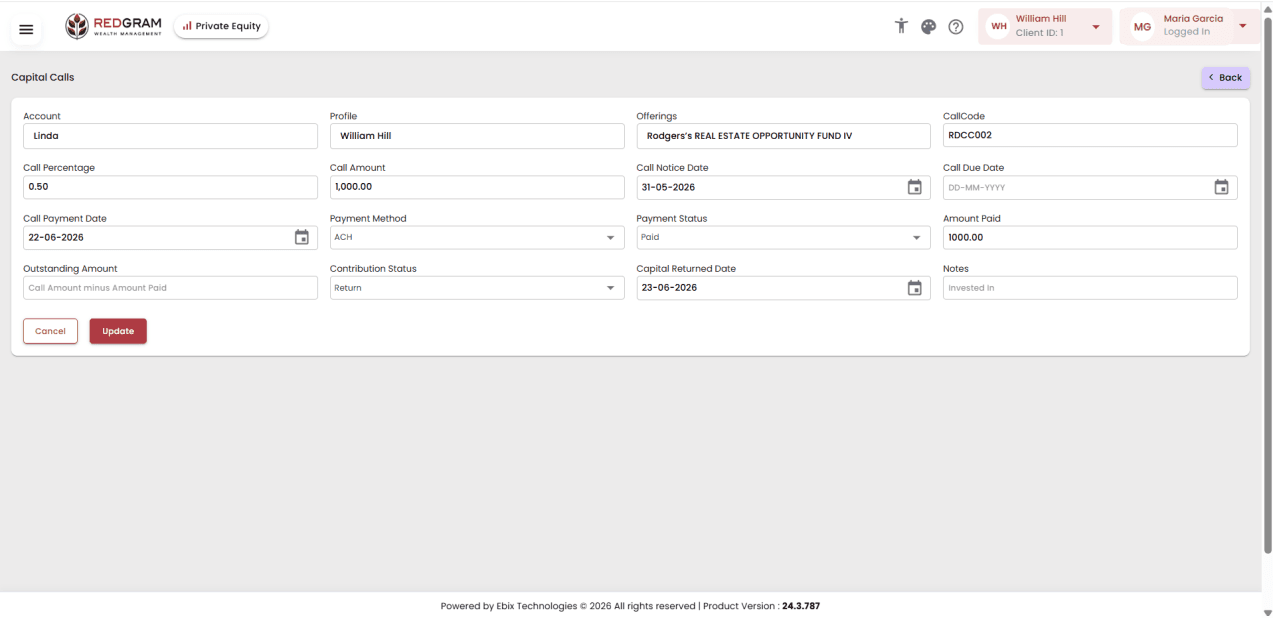
Capital Calls

Every call captured against its commitment

Call percentage, amount, notice and due dates, payment method and status, amount paid, outstanding balance, and capital returned — one form, fully reconciled.

  • Call code ties the call to the offering
  • ACH payment method and paid status tracked
  • Contribution status including returns
ebixmeridian.com/capitalCalls
Capital Calls entry form
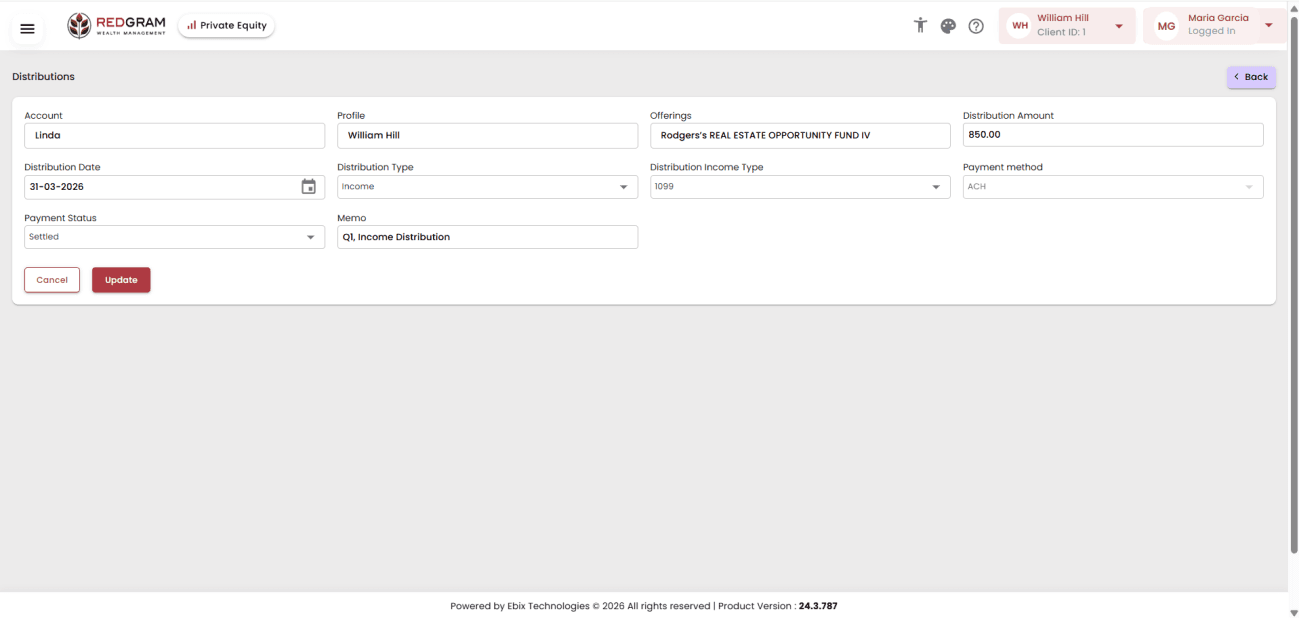
Distributions

Distribution events with income typing

Each distribution carries amount, date, distribution type, income type (K-1 or 1099), payment method, settlement status, and a memo — clean records for tax season.

  • Income vs. return-of-capital distribution types
  • 1099 and K-1 income classification
  • Settled status with payment method
ebixmeridian.com/distributions
Distributions entry form with 1099 income type
Investor Visibility

Called vs. paid vs. outstanding — live

Investors and advisors see total called, total paid, and outstanding balance per offering with call percentage and status — the same governed record the Fund Manager works from.

  • Capital calls tab on My Investments
  • Per-offering call detail with dates and notes
  • Year and status filters
ebixmeridian.com/myInvestments
Capital calls tracking on My Investments

Actual product screens, shown as configured and white-labeled for RedGram Wealth Management — an investment advisory firm running on EbixMeridian. Your firm gets the same portal under your own brand.

0

Transaction masters

0%

Audit-trailed entries

.xlsx

Bulk import format

0

Income types (K-1 / 1099)

Import Data

Move your book in without re-keying it

The Advisor or Fund Manager uploads Commitments, Capital Calls, and Distributions through Excel files on the Import Data screen from the Tools menu — migration and monthly loads without manual entry.

Excel import for Commitments

Load commitment books in bulk through .xlsx files on the Import Data screen.

Excel import for Capital Calls

Upload capital call runs the same way — validated on the way in.

Excel import for Distributions

Bring distribution events across from your fund accounting workbooks.

From the Tools menu

Import Data lives in the Fund Manager and Advisor toolset — not a back-door script.

Reconcile the fund,
not the spreadsheets

See commitments, calls, returns, and distributions flow through one governed transaction spine.